












DRS Softech MS Access Recovery Tool for Windows
- Demo
- 41
- V20.0.0
Download for Windows
View an ad to download for free
Recover data from damaged MDB and ACCDB files
DRS Softech Access Database Recovery is a specialized utility designed to help users restore information from damaged Microsoft Access database files. The application supports the recovery of data stored in MDB and ACCDB formats and provides a structured approach to retrieving database components that may become inaccessible due to corruption, unexpected system shutdowns, software issues, or storage-related problems.
Microsoft Access databases are commonly used by businesses, educational institutions, and individual users to manage records, reports, queries, forms, and other structured information. When a database becomes damaged, accessing important content can become difficult or impossible. This software aims to address that challenge by scanning affected files and extracting recoverable information while preserving the original database structure whenever possible.
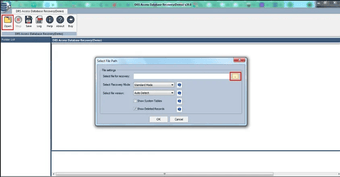
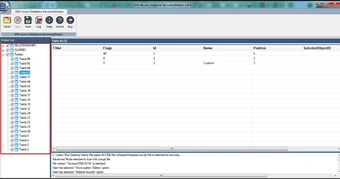
The program features an interface designed to simplify the recovery process. Users can select an Access database file, initiate a scan, and review the detected content before proceeding with restoration. This preview functionality allows users to verify recoverable items and assess the condition of the database prior to saving the recovered data.
One of the notable capabilities of the software is its support for multiple database objects. During the recovery process, it can identify and restore elements such as tables, queries, forms, reports, indexes, relationships, and macros. This broad object support makes it suitable for databases that contain a variety of interconnected components.
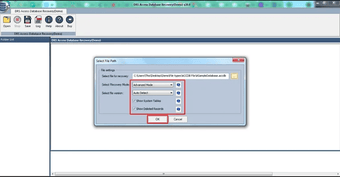
The application includes different scanning modes to accommodate varying levels of file damage. Depending on the condition of the database, users can choose an appropriate recovery method to maximize the chances of retrieving accessible information. This flexibility can be useful when dealing with databases affected by logical corruption, application errors, or incomplete file operations.
Compatibility with MDB and ACCDB file formats enables the software to work with databases created in different versions of Microsoft Access. This support helps organizations and individuals manage recovery tasks across legacy and modern database environments without requiring multiple recovery utilities.
The preview feature provides visibility into recoverable records and database objects before restoration. Users can browse detected content, inspect records, and confirm the presence of important information. This capability can save time by allowing informed decisions regarding the recovery process.
The software also focuses on maintaining data integrity during extraction. While recovery results may vary depending on the extent of database damage, the application attempts to reconstruct database components in a usable format so that recovered information can be accessed with minimal disruption.
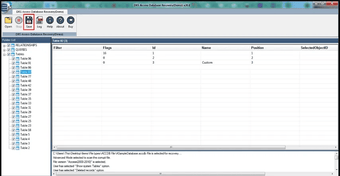
Another practical aspect of the tool is its step-by-step workflow. The recovery process follows a clear sequence that includes file selection, scanning, previewing, and saving. This straightforward design helps reduce complexity for users who may not have extensive technical knowledge of database management.
Organizations that rely on Microsoft Access databases for operational records may find the software useful when addressing unexpected database issues. Educational institutions, small businesses, consultants, administrators, and individual users can use the application to recover information that would otherwise be difficult to access.
DRS Softech Access Database Recovery serves as a practical solution for recovering Microsoft Access database content from corrupted MDB and ACCDB files. With support for multiple database objects, preview functionality, flexible scanning options, and compatibility with various Access versions, the software offers a structured method for restoring valuable information and improving accessibility to damaged database files on Windows systems.
Loading…
App specs
License
Demo
Version
20.0.0
Latest update
Platform
Windows
OS
Windows NT
Language
English
Size
2.13 MB
Developer
- DRS Softech
- More programs (10)
DRS Softech MS Access Recovery Tool for PC
- Demo
- 41
- V20.0.0
Download for PC
View an ad to download for free
User reviews about DRS Softech MS Access Recovery Tool
Have you tried DRS Softech MS Access Recovery Tool? Be the first to leave your opinion!
Add reviewTop downloads Utilities & Tools for Windows
Top downloads Utilities & Tools for Windows
Top downloads Utilities & Tools for Windows
Related topics about DRS Softech MS Access Recovery Tool
Latest articles

GTA 6 is now a “single-player experience”: new GTA Online questions

GTA 6 is now on the PlayStation Store: PS5 Pro support, price and release date

God of War Laufey reportedly targets early 2027: February or March instead of Sony’s holiday slot

PlayStation Plus gets a Costco discount: save in the US and Canada through June 26

Fallout 4 adds Project Zeta to Creations: a free expansion
Laws concerning the use of this software vary from country to country. We do not encourage or condone the use of this program if it is in violation of these laws. Softonic may receive a referral fee if you click or buy any of the products featured here.